How to track your study time — and actually keep it up
Tracking your study time works. The problem is that most people stop tracking, and the reason is rarely willpower — it is choosing a format that costs effort every single time.
This guide breaks down why logs get abandoned, compares paper, spreadsheets and automatic timer tracking, and shows how to build a log that survives past week one.
Why tracking makes studying stick
This is a mechanism, not motivation folklore. When your own behaviour becomes visible to you, you repeat it more reliably — the effect known as self-monitoring.
Studying is slow to pay off. Test scores do not move today, but “12 hours this week” is available immediately. That fast feedback carries you through the stretch before real results arrive.
- You can see the volume, so progress feels real
- Empty days stand out early, and the sooner you notice, the easier the return
- You can see where the hours went and correct a lopsided split
Three reasons study logs get abandoned
Almost every abandoned log fails for one of these reasons.
- Too much effort: writing, adding up, colouring in after every session. Once logging feels heavier than studying, it stops
- Too fine-grained: five-minute precision, ten separate subjects. The finer the grain, the higher the cost of every entry
- Never reviewed: a log you never look at is just paperwork, and paperwork gets dropped
Paper vs spreadsheet vs automatic tracking
None of these is objectively right — the one you keep using is the right one. Pick with the trade-offs in view.
| Method | Entry cost | Totals | Weak point |
|---|---|---|---|
| Paper (notebook, planner) | Every session | Manual | The burden grows over time. Keep it to one line a day |
| Spreadsheet | Every session | Automatic | Days you forget to open it become holes |
| Automatic timer tracking | Near zero | Automatic | Check where it stores data — device-only history can’t move |
The format that lasts: timer and log in one
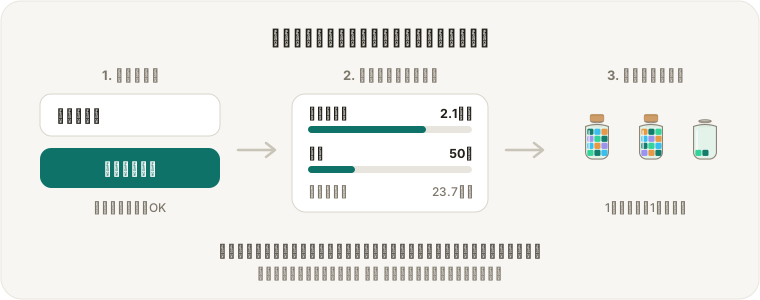
The most reliable setup is one where the timer that measures is also the thing that records. That is how FocusBlock is built.
Type what you are working on in “What are you focusing on?” and press start. Every time a focus session finishes, that time is added to that label automatically. There is no moment where you stop studying in order to record something.
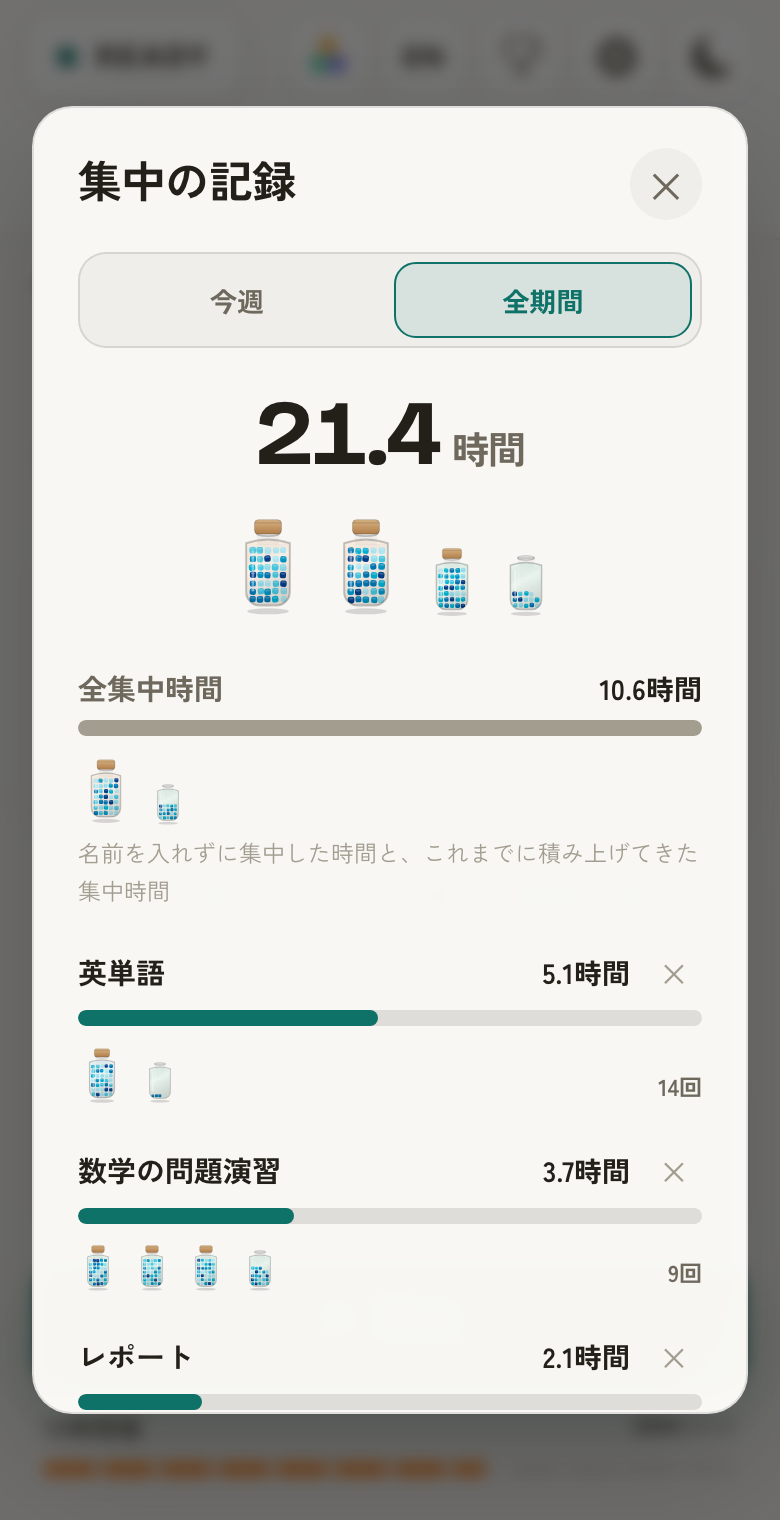
- Leaving it blank is fine — unnamed focus collects under “All focus time”
- Switch between this week (by day), 12 weeks (by week), this year and all time (by month) to see the trend and the hours per label
- Every focused minute becomes a block, and 60 of them become one jar. “Two jars this week” lands harder than a number
- No signup, no install — the record starts the moment you open the page
How to review it: once a week, totals only
A log only pays off when it is read back. That does not mean daily. Five minutes, once a week is plenty.
- Look at this week’s total — up or down is enough of a verdict
- Look at the split by label. Is everything going to your favourite subject?
- Set one goal for next week, as a number: "two more hours of English"
Where the record is actually stored
To be straight about it: FocusBlock keeps your records inside your own browser only. Nothing is sent to a server — that is why no account is needed.
The trade-off is real: clearing browser data, switching devices or using a private window will not carry the history over. For anything you want to keep for years, copy the totals into a notebook or spreadsheet at milestones.
FAQ about tracking study time
Should I log my study time every single day?
Avoid any format that requires a daily writing habit. With automatic timer tracking, days you studied record themselves and days you did not stay blank — which is exactly the information you want.
How many hours a day should I be studying?
Comparing against your own previous week beats any published target. Track for one week, take the average, then add 30 minutes a day. It matters far more that you stop counting time you were not actually focused.
Is paper or an app better for a study log?
Whichever one you keep using. Apps win on totals and review; paper wins when the act of writing is itself motivating. Using both works if the app owns the time and paper owns the notes.
Should breaks count as study time?
No. Counting only focused time keeps the number meaningful as a measure of work done. A pomodoro timer separates focus from breaks for you, so there is nothing to decide.
Where is my recorded data stored?
In FocusBlock it is stored only in your browser (local storage). No account is required and nothing is uploaded to a server — but clearing browser data or changing devices means the history does not follow you.