Time Management at Work — Interruptions, Home Working and Deep Focus
"I can’t stay focused." "Suddenly it’s five o’clock." Whether you’re in an office or at home, a Pomodoro timer rebuilds the rhythm: 25 minutes on, 5 off, repeated.
This guide starts with interruptions, then covers working from home, deep work, and coding and creative work. How to apply it changes a lot with the kind of job, so start with what fits yours.
Why it works for professional work
Focus at work dies from two things: interruptions from notifications and email, and the fatigue of trying to push through in one long stretch. A 25-minute boundary lowers the cost of starting, and frequent breaks keep your capacity from bottoming out.
There’s a second effect specific to work: you can judge a day by focused time rather than by how busy it felt. Once you know how much you actually got your hands on, you plan the next day differently.
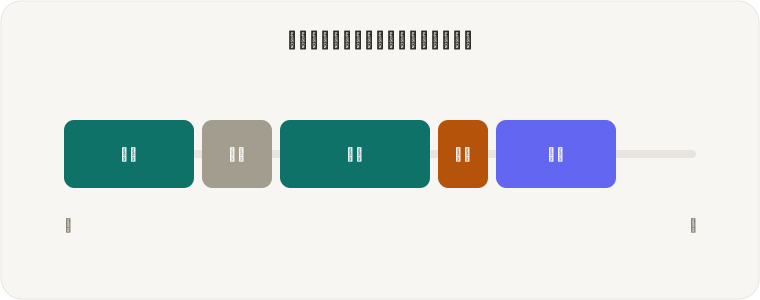
Interruptions are where the leverage is
The real cost of an interruption is not the minutes it took, but the time to get back. One glance at chat and the structure you were holding in your head is gone — you rebuild it from scratch. That’s how a five-minute interruption eats twenty.
So the answer isn’t replying faster; it’s replying in batches. When something arrives, pause and think “I’ll handle it when this round ends.” Not reacting reflexively is most of the win.
- Notifications off for the 25 minutes only (there’s no need to go dark all day)
- Process email and chat between rounds, in one pass
- In an office: headphones plus a visible "back in 25" signal cuts the volume physically
- On heavily interrupted days, shorten the rounds (15–25) so more of them finish
The right interval per kind of work
The best length varies enormously by task. There’s no reason to apply 25 to all of it.
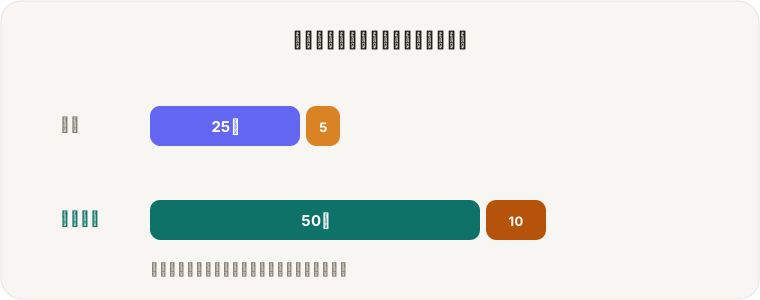
| Kind of work | Focus / break | Why |
|---|---|---|
| Email, admin, small tasks | 15 / 3 | Keep the pace up. Longer rounds sag in the middle |
| Decks, planning, writing | 25 / 5 | The default — sustained focus with regular checkpoints |
| Coding, design, engineering | 50 / 10 | Long warm-up. Short rounds end during the climb |
| Deep work with real runway | 90 / 20 | For a morning you fully control. Rest proportionally |
Working from home
Home working is comfortable, but nobody is watching and everything is distracting, so focus collapses more easily. An office has a commute to mark the switch; home has nothing.
So build one: pressing the timer becomes the start of work. It’s a small gesture, but the missing switch is home working’s biggest weakness, and filling it changes how the day begins.
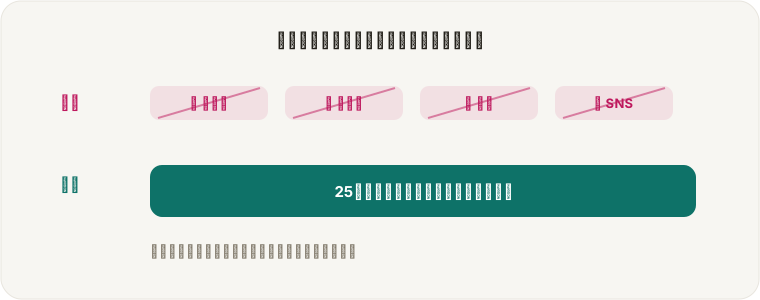
- Phone in another room, or in a drawer with notifications off
- Don’t work from the bed or the sofa (sleepiness and drift start there)
- Chores like "I should do laundry" get written down and moved to a break
- Breaks mean standing up. You move so little at home that it has to be deliberate
Scheduling deep work so it survives
Deep work means going far into one thing without notifications or admin interrupting. Unlike answering email, it’s what actually produces results and learning.
The critical point: deep work never happens in leftover time. Leftover time always fills with small tasks. The only method that holds is putting "focus" on the calendar first.
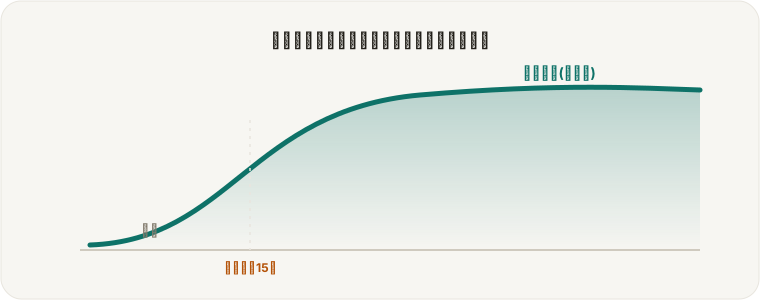
- Book it as a “focus” event so meetings can’t take the slot
- Give your sharpest hours (mornings, for most people) to the deep work
- Cluster meetings in the afternoon and keep mornings unfragmented
- Start at one or two blocks a day. Trying to defend all of it fails
Keeping flow while coding or making things
Creative and engineering work rewards deep immersion, which is why here you should avoid treating Pomodoro as a rule.
If the timer rings while you’re genuinely in flow, carry on to a sensible stopping point. This is a tool for protecting focus, not a set of regulations. On the other hand, write one line about what comes next before you break — the restart afterwards is dramatically faster.
- Aim for one block = one feature or ticket
- Split anything heavy into design / build / test across separate blocks
- When stuck, take the break deliberately. Solutions frequently arrive while walking
The afternoon slump, and break design
Everyone loses focus after lunch. Rather than grinding, rebuild with better breaks — pushing through here means a shallow rest of the day.
- Breaks mean fully leaving (stand, walk, look far away)
- When sleepy, close your eyes for five minutes or move a little
- Caffeine at the start of a break (it takes 20–30 minutes)
- After a long round, rest 15–30 minutes properly
Focus at work — FAQ
Can I use it at work for free?
Yes. FocusBlock is free with no sign-up, on a computer or a phone, straight from the browser. Nothing needs installing, so it works on locked-down machines. Data stays on your device and is never sent to a server.
Interruptions make it impossible.
Use shorter rounds (15–25 minutes) and decide in advance that interruptions get handled once the current round ends. Remember the cost is not the interruption itself but the time to rebuild your train of thought.
What length for deep work?
50 minutes of focus and 10 of break is a good target. Start nearer 45 if you are new to it and adjust upward. On a day with real runway, 90 minutes works, provided the break scales with it.
The timer breaks my flow at 25 minutes.
Either set a longer interval, or simply carry on to a sensible stopping point when you are genuinely in flow. Pomodoro is a tool, not a rule. FocusBlock takes any focus length from 1 to 90 minutes.
Working from home, I never feel like I did anything.
A tool that stacks your focused time makes the day visible at the end of it. Judging a day by focused time rather than by how busy it felt also changes how you plan the next one.